

How Embedding Works
When you create an IFrame test on AutoProctor, you provide a URL to your quiz (hosted on JotForm, Typeform, ProProfs, or any other platform). AutoProctor loads that URL inside an iframe, a browser window within a window. Everything inside the iframe comes directly from the quiz provider. AutoProctor wraps the proctoring layer around it but has no access to the quiz content itself. You know how a blog post can embed a YouTube video? The blog controls the page layout, but the video itself comes from YouTube. If the video is unavailable, the blog cannot fix it. IFrame tests work the same way: AutoProctor is the blog, and your quiz provider is YouTube. Think of it like a picture frame. The frame (AutoProctor) holds the picture, but it does not control what is printed on it.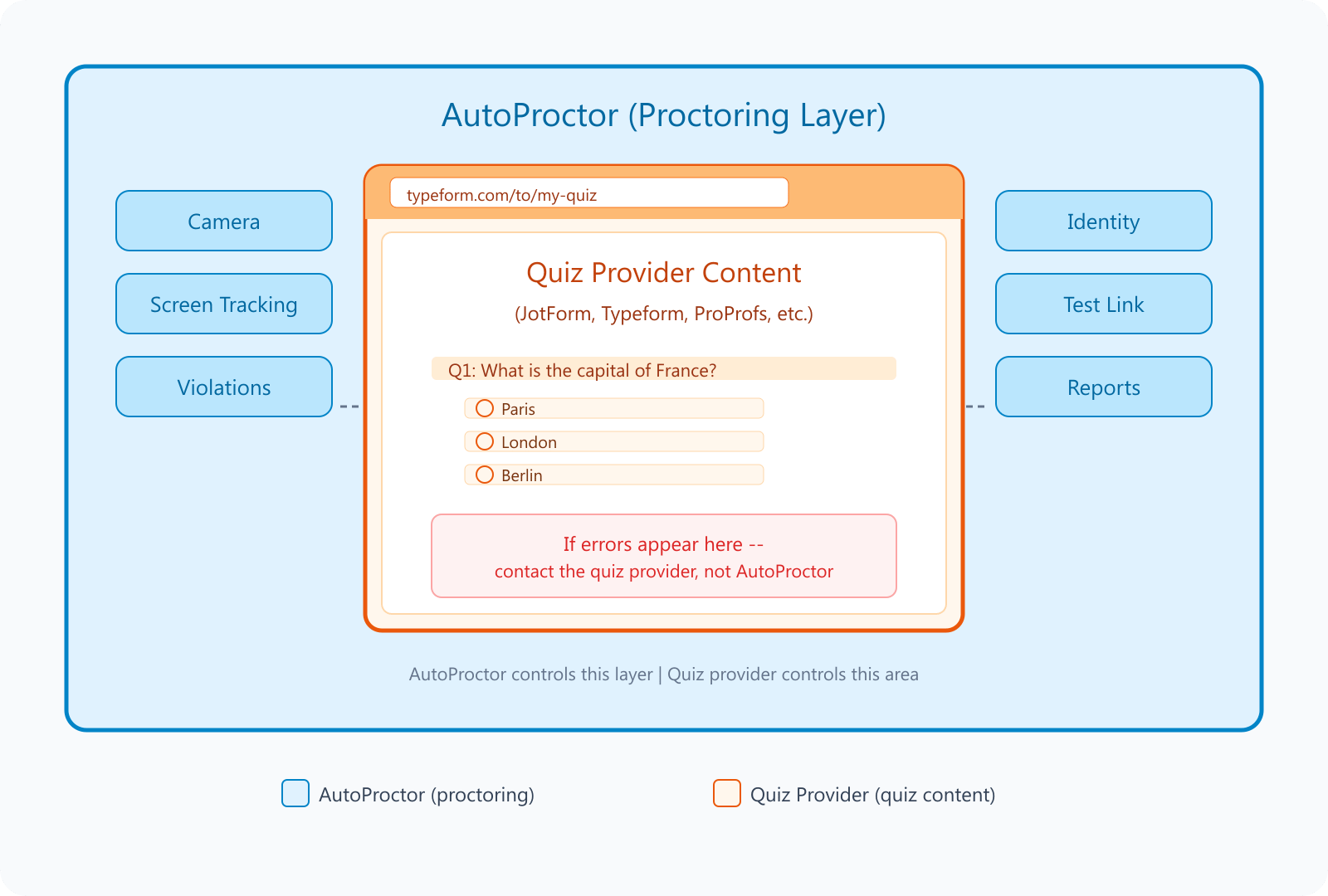
AutoProctor provides the proctoring layer around the quiz. The quiz content is served entirely by the external provider.
Common Issues That Come from the Provider
If participants report problems inside the quiz area, the issue is almost certainly with the quiz provider.Open the quiz URL directly in a new browser tab (without AutoProctor). If the same problem appears there, it is a provider issue, not an AutoProctor issue.
What AutoProctor Can and Cannot Help With
If you contact us about an issue inside the quiz frame, we will not be able to investigate it because we do not have access to the provider’s systems. Contact the quiz provider directly.
What You Can Do
1
Test the quiz URL independently
Open your quiz URL in a regular browser tab. If the error appears there too, the problem is with the provider.
2
Check your provider's dashboard
Look for response limits, form status, expiry dates, or plan restrictions on your quiz provider’s website.
3
Contact the quiz provider
Reach out to the provider’s support team with the error message. They control the form and can investigate.
4
Contact us if the issue is outside the quiz
If the problem is with proctoring, the test link, camera access, or anything outside the quiz frame, contact us and we will help.
How to Avoid This Problem with AutoProctor’s Own Quizzes
With IFrame tests, AutoProctor and the quiz provider are two separate systems. When something breaks inside the quiz, we cannot help because we do not control it. Socratease is AutoProctor’s built-in quiz tool. The quiz and the proctoring are part of the same platform, so there is no third-party boundary. If something goes wrong, we can investigate and fix it directly.Related Resources
- Why Socratease? - Benefits of using AutoProctor’s built-in quiz tool
- Quiz Providers - All quiz types AutoProctor supports
- IFrame Query Arguments - Customizing how IFrame quizzes load
- Contact Us - Reach out for issues with AutoProctor (not quiz provider issues)