

Free Credits
A new Test Admin account starts on a trial with 10 free credits and every Premium feature. Once you use them up, you need a subscription to continue.
How Credits Are Used
Every proctored attempt uses 1 credit. Enhanced proctoring features add extra credits to each attempt.
If you turn on the four +4 features together, they add 12 credits, not 16. See Enhanced Proctoring for what each feature does.
Purchase a Subscription
1
Click Subscribe
Click Subscribe below the credits card at the bottom of the sidebar. It opens the Pricing page.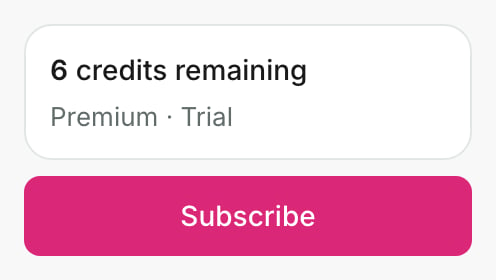
2
Choose a Plan and Pay
On the Pricing Page, choose a plan and a billing frequency, then pay. Any trial credits you still have carry over to your new plan.
Each plan comes with a set number of credits, for example 150. The same number is added every time the subscription renews. The Renews on tile on the Overview tab shows the date of your next charge.

Top Up Your Subscription
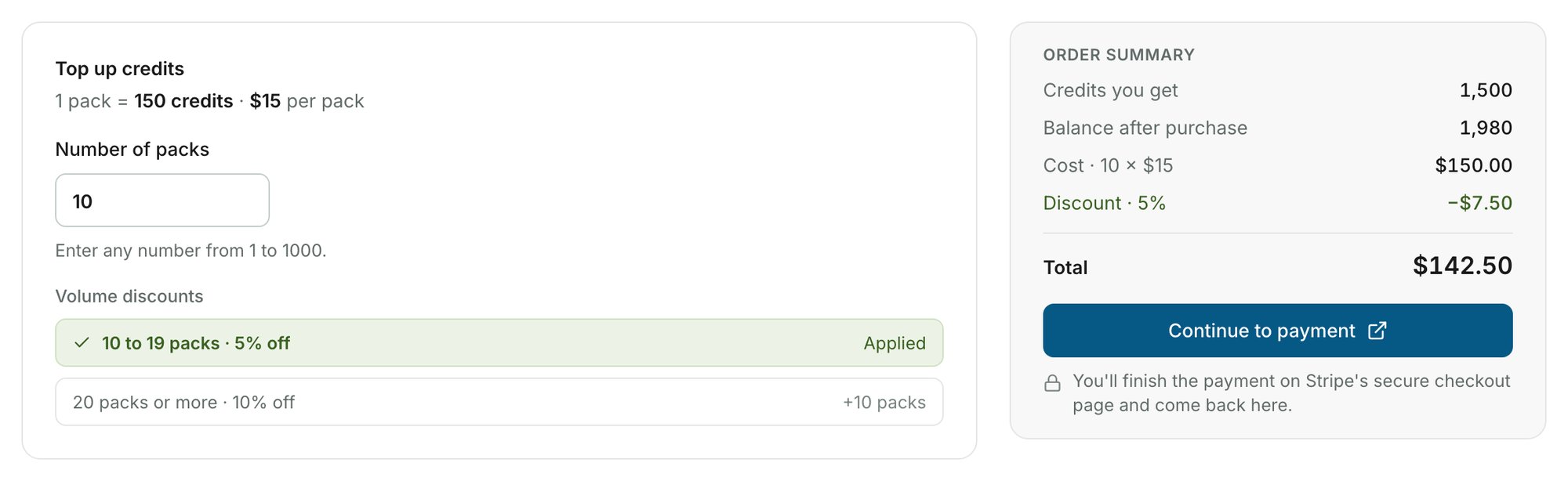
If you need more credits than your plan provides, buy credit packs. You can buy from 1 to 1,000 packs in one purchase.1
Open the Top up Tab
Go to the Top up tab of the Subscription & Billing page.
2
Enter the Number of Packs
Enter the Number of packs. The Order summary shows the credits you get and the total.
3
Pay
Click Continue to payment and pay on Stripe’s checkout page. The credits are added to your balance a moment after you return.
If you purchased credit packs but cannot see them in your account, see Purchased Packs Not Showing Up.
Credit Rollover
As long as you maintain an active subscription, credits do not expire. They roll over into the next billing period, on top of your renewal credits.
Discounts
Quarterly and Yearly plans cost less than Monthly. Large top-ups also get a volume discount, applied automatically in the order summary.
See the Pricing Page for prices and the Pricing Calculator.
Related Resources
- Track Test Pack Usage - Monitor how your credits are being consumed
- How to Cancel Your Subscription - Step-by-step cancellation instructions
- One-Time Subscription - Use AutoProctor for a single event
- Elite Features - Features available on the Elite plan
- Invoices for Payments - Access and download your invoices
- FAQs - Common questions about AutoProctor