> ## Documentation Index
> Fetch the complete documentation index at: https://help.autoproctor.co/llms.txt
> Use this file to discover all available pages before exploring further.
# Question Banks
> Create large pools of questions and serve randomized subsets to candidates using Question Banks.
Question Banks let you create large pools of questions and serve a random subset to each candidate. Every candidate receives a different combination of questions, reducing the chance of cheating while maintaining a consistent assessment structure.
Question Banks are an **Elite** plan feature. You need an Elite subscription to create and use Question Banks and Question Bank Quizzes. See [Elite Features](/elite-plan-features) for details.
## What is a Question Bank?
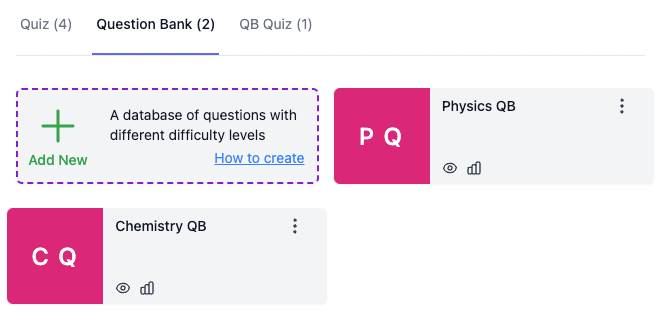
A Question Bank (QB) is a collection of questions organized by subject or topic. Each question in the bank can have a different point value and difficulty level. When candidates take a test, they receive a randomly selected subset from the bank rather than the full set of questions.
 ### Example: Physics and Chemistry Tests
Imagine you have two Question Banks:
* **Physics Question Bank** -- 100 questions across various difficulty levels
* **Chemistry Question Bank** -- 100 questions across various difficulty levels
You can create different quizzes that draw from these banks with different weightings:
| Quiz | Physics Questions | Chemistry Questions | Total |
| -------------------- | ---------------------------- | ---------------------------- | ------------ |
| Physics Major Quiz | 40 questions (2 points each) | 10 questions (1 point each) | 50 questions |
| Chemistry Major Quiz | 10 questions (1 point each) | 40 questions (2 points each) | 50 questions |
Each candidate receives a different random subset of questions from the respective banks, but the overall structure (number of questions, points, difficulty distribution) stays consistent across all candidates.
## Question Bank Quizzes (QBQ)
Candidates cannot attempt a Question Bank directly. You must create a Question Bank Quiz and add it to an AutoProctor test for candidates to take.
### Example: Physics and Chemistry Tests
Imagine you have two Question Banks:
* **Physics Question Bank** -- 100 questions across various difficulty levels
* **Chemistry Question Bank** -- 100 questions across various difficulty levels
You can create different quizzes that draw from these banks with different weightings:
| Quiz | Physics Questions | Chemistry Questions | Total |
| -------------------- | ---------------------------- | ---------------------------- | ------------ |
| Physics Major Quiz | 40 questions (2 points each) | 10 questions (1 point each) | 50 questions |
| Chemistry Major Quiz | 10 questions (1 point each) | 40 questions (2 points each) | 50 questions |
Each candidate receives a different random subset of questions from the respective banks, but the overall structure (number of questions, points, difficulty distribution) stays consistent across all candidates.
## Question Bank Quizzes (QBQ)
Candidates cannot attempt a Question Bank directly. You must create a Question Bank Quiz and add it to an AutoProctor test for candidates to take.
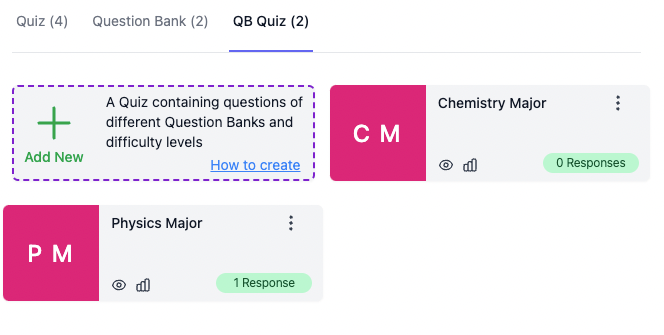 A Question Bank Quiz specifies:
* Which Question Banks to draw questions from
* How many questions to include from each bank
* The difficulty levels to include
* The point values for each difficulty level
You can combine multiple Question Banks in a single QBQ, or use one bank to supply questions at varying difficulty levels.
## How to Create a Question Bank Quiz
Navigate to the Question Banks section in AutoProctor and create a new Question Bank. Add your questions, assigning point values and difficulty levels to each.
Create a new Question Bank Quiz (QBQ). Select which Question Banks to draw from, how many questions to include, and which difficulty levels to use.
Add the QBQ to an AutoProctor test. Share the test link with your candidates.
## Related Resources
* [Bulk Import from Excel](/import-questions-from-excel) -- Import questions in bulk to populate your Question Banks
* [Question Types](/socratease-question-types) -- Available question formats for use in Question Banks
* [Using Tags](/using-tags) -- Organize questions with tags for filtering and grouping
* [Quiz Settings](/socratease-quiz-settings) -- Configure your quiz behavior
* [Elite Features](/elite-plan-features) -- Learn about Elite plan capabilities
A Question Bank Quiz specifies:
* Which Question Banks to draw questions from
* How many questions to include from each bank
* The difficulty levels to include
* The point values for each difficulty level
You can combine multiple Question Banks in a single QBQ, or use one bank to supply questions at varying difficulty levels.
## How to Create a Question Bank Quiz
Navigate to the Question Banks section in AutoProctor and create a new Question Bank. Add your questions, assigning point values and difficulty levels to each.
Create a new Question Bank Quiz (QBQ). Select which Question Banks to draw from, how many questions to include, and which difficulty levels to use.
Add the QBQ to an AutoProctor test. Share the test link with your candidates.
## Related Resources
* [Bulk Import from Excel](/import-questions-from-excel) -- Import questions in bulk to populate your Question Banks
* [Question Types](/socratease-question-types) -- Available question formats for use in Question Banks
* [Using Tags](/using-tags) -- Organize questions with tags for filtering and grouping
* [Quiz Settings](/socratease-quiz-settings) -- Configure your quiz behavior
* [Elite Features](/elite-plan-features) -- Learn about Elite plan capabilities